

 By
Introduction
In Oracle Fusion HR Help Desk (HRHD), an HR Help Desk status update can be automated when an employee responds to an existing service request. When an agent requires additional information, the request status is changed to Waiting while awaiting the employee’s response. Once the employee replies through the HR Help Desk portal or email, the system can automatically update the request status to Employee Response Received.
In this article, we will explore how to configure a Groovy trigger using Application Composer to achieve this requirement.
Business Use Case
- Employee: Submits an HR Help Desk request describing a query or issue.
- Agent: Picks up the request and starts working on it.
- Agent: Requires additional information and changes the request status to Waiting.
- Employee: Responds to the agent’s clarification request through the HR Help Desk portal or email.
- System: Automatically changes the request status to Employee Response Received.
Expected outcome: The agent can easily identify employee responses and resume working on the request.
Step-by-Step Solution
Step 1: Create a Custom HR Help Desk Status
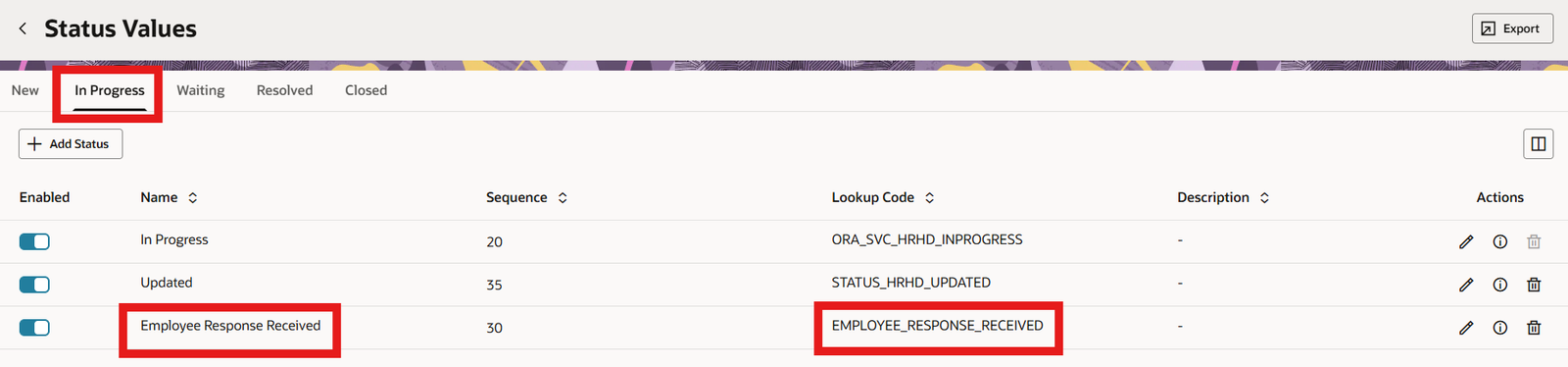
First, create a custom status named Employee Response Received from the status configuration page for HR Help Desk requests.
- Status name: Employee Response Received
- Lookup code: EMPLOYEE_RESPONSE_RECEIVED
In the example shown below, the custom status is configured under the In Progress status group. The page used to configure status values may differ depending on your Oracle Fusion release.
Step 2: Activate a Sandbox and Open Application Composer
To configure the Groovy trigger, create or open a sandbox and activate it. From the Sandbox Tools menu, select Application Composer.
Step 3: Navigate to the HR Help Desk Request Message Object
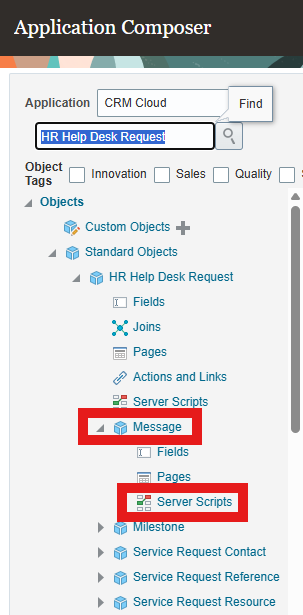
In Application Composer, search for the HR Help Desk Request standard object. Expand the object, select its Message child object, and then open Server Scripts.
Navigation: Application Composer > Standard Objects > HR Help Desk Request > Message > Server Scripts
Step 4: Create an Oracle HCM Groovy Script Using Application Composer
Create a trigger on the Message child object. Oracle’s documented approach for processing a newly created customer response uses the Before Insert in Database trigger type. This is important because an employee reply creates a new message record.
- Trigger name: Update HRHD Ticket Status
- Trigger type: Before Insert in Database
- Object: Message (child of HR Help Desk Request)
/*
 * Created By: Deepak Kesarwani
 * Trigger Name: Update HRHD Ticket Status
 * Trigger Type: Before Insert in Database
 * Object: Message (child of HR Help Desk Request)
 */

def HRparentStatus = HRHelpDeskRequest?.StatusCd
def HRparentStripe = HRHelpDeskRequest?.StripeCd

if ((SourceCd == 'ORA_SVC_CUSTOMER_UI' || SourceCd == 'ORA_SVC_INBOUND_MSG') &&
(ChannelTypeCd == 'ORA_SVC_WEB' || ChannelTypeCd == 'ORA_SVC_EMAIL') &&
MessageTypeCd == 'ORA_SVC_CUSTOMER_ENTRY' &&
HRparentStatus != 'ORA_SVC_HRHD_RESOLVED' &&
ParentMessageId != null &&
HRparentStripe == 'ORA_SVC_HRHD') {

if (BaseRequest != null) {
        HRHelpDeskRequest?.setAttribute(
         'StatusCd',
            'EMPLOYEE_RESPONSE_RECEIVED'
     )
}
}Understanding the Script Conditions
- SourceCd: Allows messages originating from the customer UI or inbound messaging.
- ChannelTypeCd: Restricts processing to web or email channels.
- MessageTypeCd: Ensures the message is an employee/customer entry.
- HRparentStatus: Prevents the status update when the request is already Resolved.
- ParentMessageId: Helps identify a response associated with an existing message thread.
- HRparentStripe: Ensures the logic applies to HR Help Desk requests.
- StatusCd: Updates the parent HR Help Desk request to EMPLOYEE_RESPONSE_RECEIVED.
Testing Recommendations
Test the trigger in a non-production environment before moving the sandbox changes to production. Validate at least the following scenarios:
- An employee replies through the HR Help Desk portal to a request in Waiting status.
- An employee replies by email to a request in Waiting status.
- An agent adds a message; the employee-response status should not be set.
- A message is added to a request that is already Resolved; the status should remain unchanged.
- A message belongs to a non-HR Help Desk request; the HR Help Desk-specific logic should not run.
Also verify that the custom status lookup code in the script exactly matches the lookup code configured in Step 1.
Conclusion
By configuring a Groovy trigger on the HR Help Desk Request Message object, you can automate the status update when an employee responds to an existing request. This helps agents identify employee responses more easily and continue working on requests without manually updating the status.
Note: The exact configuration screens and available fields may vary by Oracle Fusion release. Validate the trigger and script in your own environment before deploying it.