

 By
Introduction
Oracle Fusion HCM HR Help Desk uses security roles and data security policies to control which categories users can access. In this guide, I’ll walk through how to configure a data security policy for HR Help Desk and validate the access for employees and HR Help Desk agents.
Business Use Case
Consider a business where HR Help Desk is being used by employees and HR Help Desk agents.
The organization wants to ensure that users can access only those categories they are authorized to access.
- Employees should be able to access their relevant categories such as Payroll, HR Support, and Benefits.
- HR Help Desk agents should have access to all the categories.
- Access should be controlled through Oracle Fusion HCM security roles and data security policies.
To support this requirement, we need to configure the appropriate Data Security Policy.
Prerequisites
- Access to Security Console or the required security configuration area.
- Configure categories in “Manage Categories for HR Help Desk Requests”.
- Configure conditions for Employees and Agents in “Manage Database Resource” under
SVC_CATEGORIES.
Step 1: Open Security Console
Sign in to Oracle Fusion HCM with the required security privileges.
Navigate to:
Navigator > Tools > Security Console
The Security Console is used to manage roles, role hierarchies, and security-related configurations.
Step 2: Modify or Create a Custom Role
If a custom role has not been created already, copy the delivered job role “Next Gen Human Resource Help Desk Agent”.
Give the custom job role a name according to your organization’s naming convention.
Step 3: Configure the Data Security Policy
Configure the data security policy using the values below.
| Field | Value |
| Policy Name | Agent Categories List |
| Database Resource | Agent Categories List |
| Start Date | SQL Predicate |
| Data Set | Select by Instance Set |
| Condition Name | Agent Categories List |
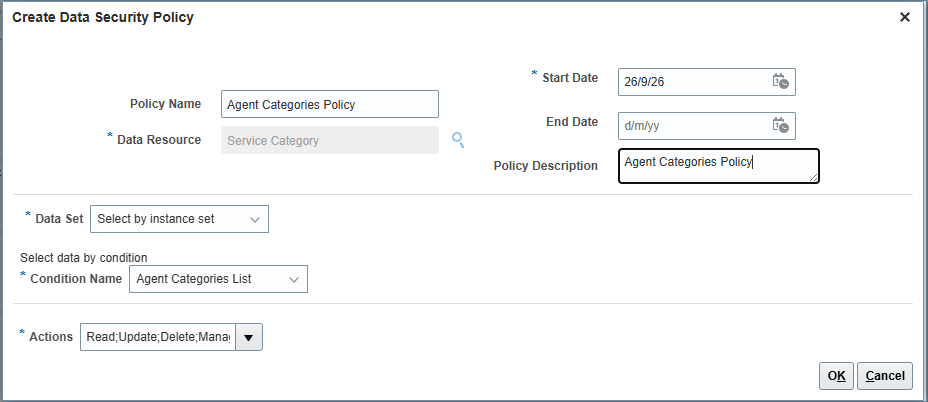
Figure 1: Configure the Data Security Policy.
Similarly, create the data security policy for employees. Use a copy of the delivered job role “Next Gen Human Resource Help Desk User”.
Step 4: Validate the Role and Policy
After configuring the policy, review the role and confirm that the required access is available.
Validate the configuration with an appropriate test user.
Test 1 – HR Help Desk Agent
Log in as an HR Help Desk agent and verify that the agent can access all the required categories.
Test 2 – Employee
Log in as an employee and verify that the employee can access only the permitted categories.
Related Article
This Data Security Policy configuration can be used as a supporting step for HR Help Desk configuration.
If your requirement is to restrict the HR Help Desk categories available to Employees and Agents, see:
How to Restrict HR Help Desk Categories in Oracle Fusion HCM
In that article, we walk through the functional configuration required to control which HR Help Desk categories are available to different users.
Conclusion
Data Security Policies are an important part of Oracle Fusion HCM security. They help control who can access specific data and what actions they can perform.
For HR Help Desk implementations, the security configuration should be designed together with the functional requirement. After configuring the policy, always validate the result using representative test users and the actual business scenario.
This helps keep the HR Help Desk configuration secure while providing users with the access they need to perform their responsibilities.
If you found this article useful, feel free to comment and share your feedback. I’ll continue sharing practical Oracle HCM and HR Help Desk solutions based on real-world learning and implementation experience.
1 Comment