

 By
Introduction
When employees raise HR questions, the request needs to reach the right team without unnecessary delays. A payroll question, for example, may need a different team from a benefits query or a general HR question. Oracle Fusion HR Help Desk provides configuration options that help organizations classify requests and route them for handling.
In this article, we’ll walk through three building blocks – categories, queues, and assignment rules – and then look at a simple example of how they work together. The screenshots and sample names below are illustrative of a demo setup; confirm the exact navigation and options in your own Oracle Fusion environment before applying them.
What you’ll learn
- How categories help classify HR Help Desk requests.
- How queues organize work for the teams that handle requests.
- How assignment rules route requests based on configured conditions.
- How to plan and test a basic setup before using it in production.
1. Understand the three building blocks
Categories: What is the request about?
Categories classify the subject of an HR Help Desk request. They give employees and HR teams a consistent way to identify the type of help needed.
Before creating categories, list the common questions your HR team receives and group them into labels employees can understand. Keep names distinct and avoid creating several categories that mean almost the same thing. Also confirm which categories should be available in the employee experience and which should be available to agents, based on your business requirements and access design.
Learn how to control category visibility for employees and agents in How to Restrict HR Help Desk Categories in Oracle Fusion HCM.
Queues: Where should the work be organized?
A queue groups requests for handling. Think of it as a work basket for a defined type of work or team. For example, an organization might create Payroll Support and Benefits Support queues if different teams handle those topics.
Design queues around how work is actually managed. Each queue should have a clear purpose, an owner, and a plan for coverage. Queue setup and agent/resource membership are related but separate considerations; a queue existing in the system does not by itself mean the right agents have been added to it.
Assignment rules: How does a request reach the right queue?
Assignment rules use configured conditions to route a request to a queue. For example, a rule can check the request category and assign a Payroll request to the Payroll Support queue. The available conditions depend on the objects and attributes enabled for your setup.
Keep rules understandable and testable. Where a rule set contains multiple rules, ensure the conditions are designed so the resulting queue is predictable. Oracle guidance notes that queue assignment rules should be republished after changes, and that the queues must exist before rules are configured.
2. Configure categories, queues, and assignment rules
The following steps reflect the demo setup shown in the screenshots. Oracle page labels and navigation can vary by release and user experience, so use these as a guide and verify the task names in your environment.
Step 1: Create categories
In Setup and Maintenance, open the Help Desk offering and Help Desk Request functional area, then use the task Manage Categories for HR Help Desk Requests. Create clear category names and unique category codes.
| Category name | Sample category code |
| Payroll | DEMO_PAYROLL |
| Benefits | DEMO_BENEFITS |
| HR General Questions | DEMO_HR_GENERAL_QUESTIONS |
| Employee BGC | DEMO_EMPLOYEE_BGC |
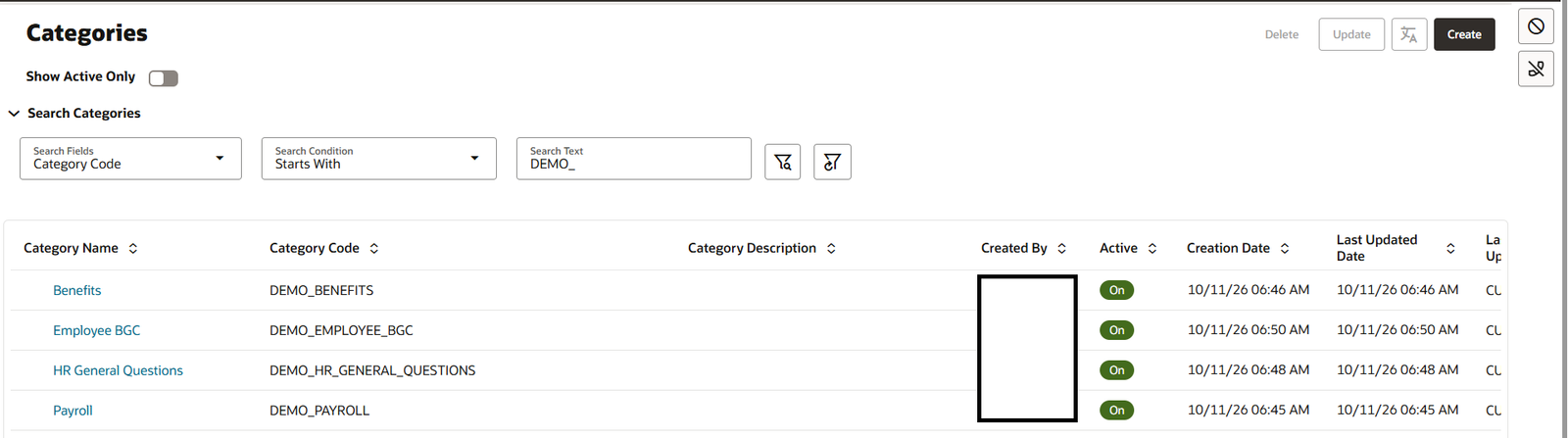
Figure 1. Example HR Help Desk categories and category codes.
These names and codes are examples from a demo environment. Use codes that follow your organization’s naming standards, and confirm that each code is unique where required.
Step 2: Create queues
Create queues for the teams that will handle the requests. In the demo, the queue list contains the following examples:
| Queue name | Activation | Distribution |
| Demo Payroll Support | Enabled | Automatic (Push) |
| Demo Benefits Support | Enabled | Automatic (Push) |
| Demo HR Support | Enabled | Automatic (Push) |
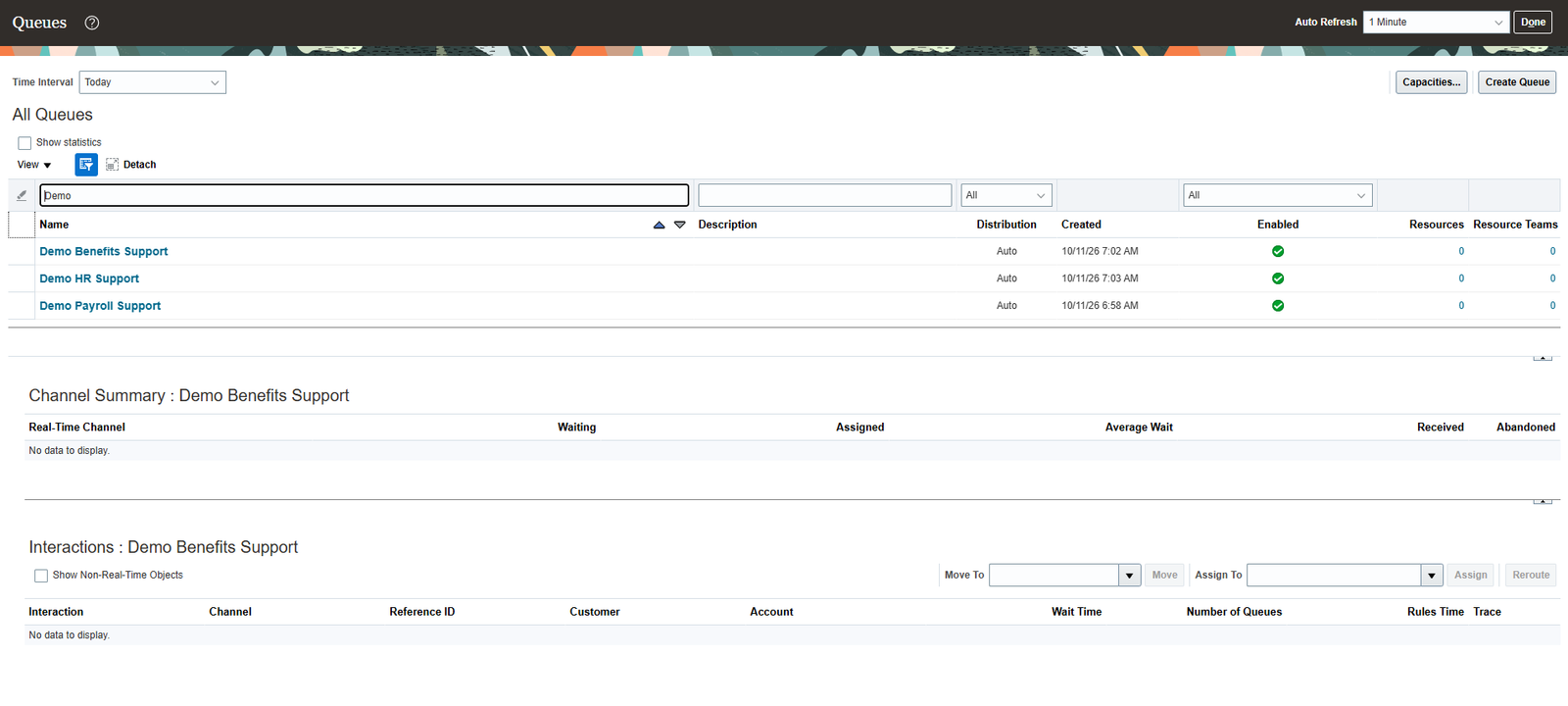
Figure 2. Example queue list in the Help Desk console.
Confirm the appropriate activation and distribution settings for your use case. Also check queue resources and resource teams: queue creation and the assignment of agents/resources to queues are not the same step. Resource membership and access are covered in the next article in this series.
Step 3: Create an assignment rule set and rules
In Setup and Maintenance, open Help Desk > Assignment and Routing > Manage Service Assignment Rules. Create a rule set and select HR Help Desk Request Queuing Rules as its category. Then add rules to route matching requests to the appropriate queues.
| Rule name | Condition (illustrative) | Action |
| Demo Payroll Rule | If Category = Payroll | Assign to Demo Payroll Support |
| Demo Benefits Rule | If Category = Benefits | Assign to Demo Benefits Support |
| Demo HR Support Rule | If Category is HR General Questions or Employee BGC | Assign to Demo HR Support |
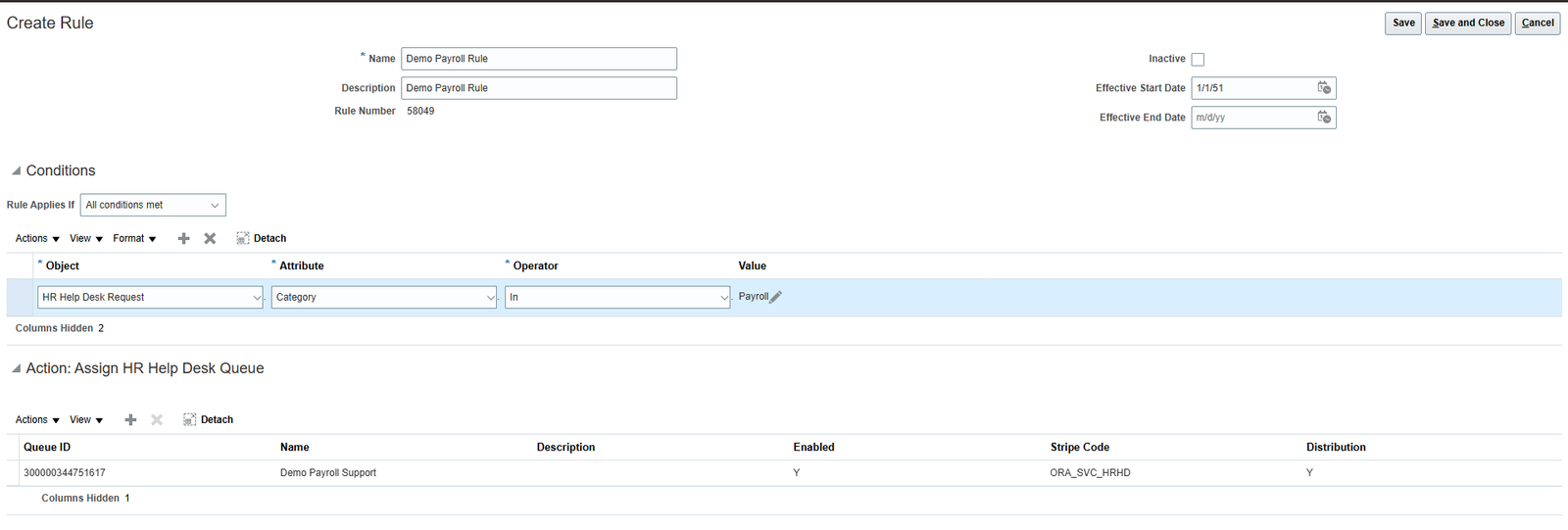
Figure 3. Example assignment rule: route Payroll requests to the Payroll Support queue.
Save the rule and publish the rule set when configuration is complete. If you change a rule or change the status of an associated queue, check whether the rules need to be republished. Test the actual routing behavior rather than relying only on the saved configuration.
3. How the three elements work together
Each element has a distinct role: the category describes the request, the queue organizes the work, and the assignment rule evaluates configured conditions to route the request.
| Element | Purpose | Example |
| Category | Classifies the request topic | Payroll |
| Queue | Groups requests for handling | Demo Payroll Support |
| Assignment rule | Routes matching requests | If Category = Payroll, assign to Demo Payroll Support |
For example, an employee submits a question about a payroll deduction and selects the Payroll category. When the configured assignment process runs, the rule evaluates the request and routes it to the Demo Payroll Support queue. The responsible team or assigned agent can then handle the request according to the organization’s process.
This is an illustrative example. The actual routing result depends on your rule configuration and on how queue assignment is triggered in your environment.
4. Plan the setup before configuring
A short planning exercise can help avoid rework. Before opening the configuration pages:
- List common request topics. Use real examples from the HR team and group similar questions together.
- Define clear category names. Choose labels employees can understand and avoid unnecessary overlap.
- Identify handling teams and queues. Confirm who owns each type of work and how backup coverage will work.
- Map the routing conditions. Document which request attributes should determine the destination.
- Agree on exceptions. Decide how unmatched requests, incorrect selections, or reassignment should be handled.
- Plan resource membership and access. Confirm which agents should be members of each queue and whether they have the required roles and access. This is an important part of the broader setup and will be covered in the next article.
5. Validate the setup
Test the process from both the employee and agent perspectives. Do not rely only on the fact that the configuration pages saved successfully.
- The intended categories appear in the correct user experience.
- Category names are clear and do not unnecessarily overlap.
- A test request follows the expected routing path.
- The intended queue is enabled and configured for the required distribution method.
- The relevant agents/resources are associated with the queue, where required.
- A request that does not match a specific rule has a defined handling path.
- Changes to categories, queues, or rules are followed by appropriate retesting and republishing.
6. Common design mistakes to avoid
- Designing categories only for HR agents. Employees also need to recognize the right option when raising a request.
- Creating queues without clear ownership. Every queue should have a purpose and a team that understands its responsibility.
- Leaving resource membership until the end. A queue may exist but still need the right agents/resources assigned to it.
- Using overlapping routing conditions. Overlaps can make routing results difficult to predict or troubleshoot.
- Testing only one scenario. Include different categories, user experiences, and an unmatched or exception case.
- Changing configuration without retesting. A small change can affect which requests users see or where requests are routed.
Conclusion
A reliable HR Help Desk setup starts with a clear design. Categories describe what an employee needs, queues organize the work, and assignment rules route requests according to configured conditions. Planning these elements together and testing them with realistic examples helps HR teams manage requests more consistently.
In the next article in this Foundation Learning Series, we’ll cover HR Help Desk Resources, Queue Resource Assignment, and Security Roles. We’ll look at how agents/resources are associated with queues and why the right access setup matters for handling requests.