

 By
Introduction
When an employee raises an HR Help Desk request, it is important to make sure the request reaches the right team and that the right people can work on it. Configuring categories, queues, and assignment rules is one part of the setup. You also need to associate the appropriate resources or agents with queues and confirm that their roles and data access match their responsibilities.
For example, a Payroll request should reach the intended support team. At the same time, an agent’s ability to access a request depends on the relevant resource associations, application privileges, and data security settings—not just the queue assignment.
In this article, we’ll explain the key terms, walk through resource identification and queue assignment, and share a practical checklist for reviewing security and access. Navigation labels can vary by Oracle Fusion release and configuration, so confirm them in your own environment before making changes.
1. Understand the key terms
- Resource – A person or agent who can be associated with HR Help Desk work, depending on the configuration.
- Queue – A logical work group used to organize requests for a team or area, such as Payroll, Benefits, or General HR.
- Queue resource assignment – The association between a queue and the resources expected to work on requests routed to that queue.
- Assignment rule – Configured logic that helps determine where a request should be routed. An assignment rule and a queue are related, but they are not the same thing.
- Security role – A role that provides application privileges and helps determine which actions a user can perform. Record-level access may also depend on data security configuration.
2. How resources, queues, and assignment rules work together
The flow below shows a simplified journey from an employee submitting a request to an agent handling it. The exact routing behavior depends on your configured rules and environment.
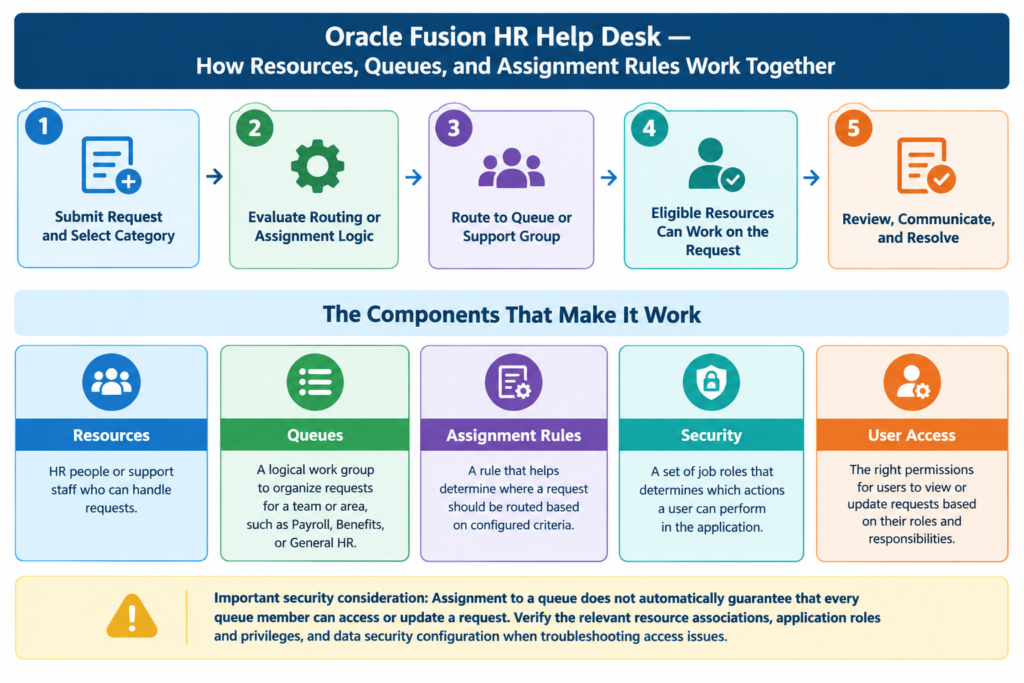
Important security consideration: A request reaching a queue does not automatically guarantee that every queue member can open or update it. Check resource associations, application roles and privileges, and data security settings when troubleshooting access issues.
3. Before you begin
Before changing the configuration, confirm the following:
- You have the appropriate access to review HR Help Desk setup and security.
- The relevant queues and categories have already been identified.
- You know which team or users should handle each request type.
- The required worker or user accounts exist and are active, where applicable.
- Your test plan includes an employee, an HR Help Desk agent, and an administrator or configuration owner.
- You have documented expected access for each role, including any restricted or sensitive request types.
4. Identify resources and assign them to a queue
Step 1: Identify the resource
In the Navigator, open Others > Resource Directory. Expand Tasks, then select Resource > Identify Resources. Navigation labels may differ slightly in your environment.
Enter the person’s name and select the appropriate Usage value (for example, Employee, where applicable). Search for the person, select the matching row, and click Add as Resource.
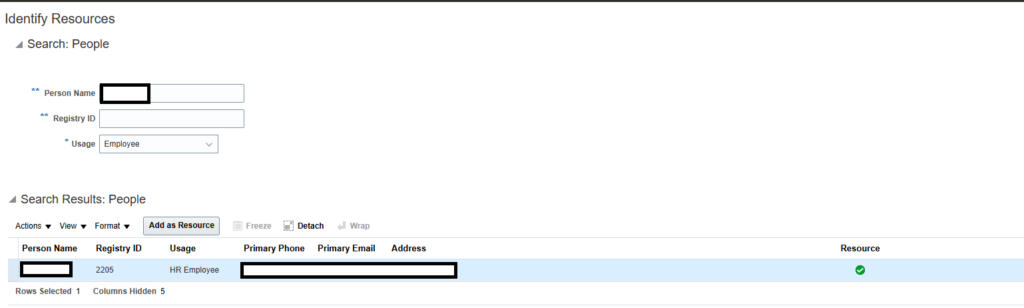
After adding the person, verify that the resource indicator appears for the selected row. In the example screenshot, a green check mark is shown in the Resource column. Confirm the status in your own environment.
Step 2: Assign the resource to the appropriate queue
Once the person has been identified as a resource, associate them with the queue they are expected to support. In Setup and Maintenance, open Help Desk > Help Desk Request > Manage Queues for HR Help Desk Requests (confirm the exact task name in your environment).
Search for the required queue and add the relevant resources. Add them one at a time if that is how your page is configured, then save your changes.
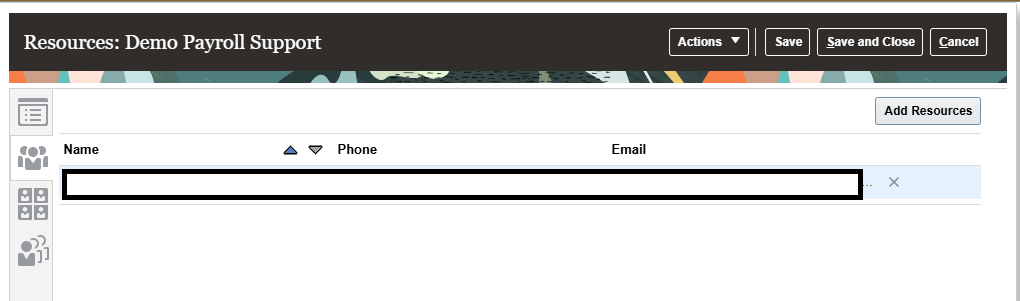
For the queue creation steps, refer to the previous article: Oracle Fusion HR Help Desk Setup: Categories, Queues, and Assignment Rules
5. Review security roles
Review the standard job roles available in your Oracle Fusion environment and confirm which roles are appropriate for your business requirements. The following role names are examples to check in your environment:
- Next Gen Human Resource Help Desk User
- Next Gen Human Resource Help Desk Manager
- Next Gen Human Resource Help Desk Agent
- Next Gen Human Resource Help Desk Administrator
If your security design requires custom roles, follow your organization’s security governance process and use the delivered roles as a reference where appropriate. Do not assume that assigning a role alone grants access to every HR Help Desk request; validate application privileges and data access separately.
6. Example: Payroll queue
Suppose employees submit Payroll questions through HR Help Desk. The organization wants these requests to be routed to the Payroll queue, where only authorized Payroll support agents can handle them. Use the table below to check that routing, resource membership, and access are aligned.
| Area | Expected configuration | What to validate |
| Category and routing | Payroll is included in the intended routing logic. | A test Payroll request reaches the correct queue. |
| Queue resources | Only the intended support resources are associated with the queue. | The appropriate agents can locate the request. |
| Agent security | Agents have the approved roles and data access for their duties. | An authorized agent can open and update the request as expected. |
| Employee access | Employees have the access needed for their own requests. | A test employee can submit and view their request. |
| Restricted access | Users outside the authorized scope do not receive unintended access. | A user without the required access cannot view or update the protected request. |
7. Testing checklist
After making setup changes, test the process with the appropriate employee and agent accounts. Record the test user, date, expected result, actual result, and any issue found.
- A request with the expected category routes to the correct queue.
- The intended queue resources can locate the request.
- An authorized agent can perform the expected actions.
- An employee can submit a request and access the information intended for them.
- An agent without the required access cannot view or update restricted information.
- Changes to roles or data access have been validated using appropriate test accounts.
- Configuration changes and test evidence are documented for future support.
8. Common issues and troubleshooting
- The request reaches the queue, but the agent cannot open it. Check the agent’s assigned roles and data access, confirm the resource association with the queue, and verify that the request is within the agent’s authorized scope.
- The request is routed to the wrong queue. Review assignment-rule conditions, rule order or precedence where applicable, the selected queue, and the test data used in the request.
- The intended agent is not available for assignment. Confirm the user/resource identity, active status, and any required setup or provisioning steps. Verify the association with the queue.
- The agent can open the page but cannot see expected records. Review role access and resource association with the queue. Page access alone may not grant access to every record.
9. Recommended implementation practices
- Maintain a simple mapping of request category > queue > responsible resources.
- Separate configuration access from day-to-day agent access.
- Apply the principle of least privilege and review access periodically.
- Test with separate employee and agent accounts rather than relying only on an administrator account.
- Document changes to queue membership, assignment rules, roles, and data access.
- Confirm role names and navigation paths in your own Oracle Fusion release before applying changes.
Conclusion
A reliable HR Help Desk setup depends on more than routing a request to a queue. The right resources must be associated with the queue, the assignment logic must route requests correctly, and each user must have the appropriate role and data access.
Start with a clear queue-to-resource mapping, validate security using test accounts, and document the results. This helps the HR Help Desk team manage employee requests more consistently while reducing access issues and unintended exposure of HR information.
1 Comment