
 By
Introduction
Imagine an HR leader finally getting a quiet moment during lunch when a stream of emails starts arriving with questions about payroll, benefits, leave, employment records, and HR policies. New joiners may also reach out with questions as they settle into the organization.
As an organization grows, managing these queries through separate emails and calls can become difficult. HR teams may struggle to track requests, identify who should handle them, and keep employees updated.
This is where Oracle Fusion HR Help Desk comes in.
In this article, we’ll look at what HR Help Desk does, why organizations use it, how a request is handled, and how beginners can get started.
1. What Is Oracle Fusion HR Help Desk?
Oracle Fusion HR Help Desk is a solution within Oracle Fusion Cloud HCM that helps organizations manage employee HR questions, service requests, and issues in a structured way.
Instead of handling every query through separate emails or informal conversations, employees can raise requests through the available channels, such as the web interface or email, depending on the organization’s setup. HR teams can review requests, route or assign them to the appropriate agents, communicate with employees, and track progress.
For example, an employee may have a question about a salary payment or a company benefits policy. They can raise a request, and the appropriate HR team can review it and respond.
The idea is simple: make it easier for employees to get HR support and for HR teams to manage requests.
2. Why Do Organizations Use HR Help Desk?
Consider an organization with thousands of employees and a small HR operations team.
Employees may contact HR for many reasons, such as:
- A question about salary or payroll.
- Clarification about leave or benefits.
- An issue with an employment document.
- A question about an HR policy.
- A request to update or clarify employee information.
If these queries are managed only through email, some requests may be missed, follow-ups may become difficult, and employees may not know the status of their requests.
HR Help Desk provides a more structured way to manage this process.
Some common benefits include:
Centralized request management: HR teams can manage requests in one place instead of relying entirely on separate email conversations.
Request tracking: Employees and authorized HR users can check request details and follow progress, depending on their access.
Assignment: Requests can be routed or assigned to the appropriate team or agent based on the configured rules.
Knowledge sharing: Employees can search available HR knowledge articles for answers to common questions.
Reporting and visibility: Available reports can help HR teams review recurring issues and service trends.
Knowledge harvesting: Agents can capture useful solutions to complex issues so that the knowledge can be reused by other agents, where this capability is available and configured.
The actual benefits depend on how the organization configures and uses the application.
3. Key Features of HR Help Desk
Before learning the technical setup, it is useful to understand some of the main features.
3.1 Service Requests
A service request is a record used to capture and manage an employee’s question, issue, or request for assistance.
For example, an employee who needs clarification about a payroll deduction may raise a service request. The HR team can review the details and work toward resolving the issue.
3.2 Categories
Categories help to organize service requests according to their subject or business purpose.
For example, an organization may configure categories such as:
- Payroll
- Benefits
- HR Support
- Employment Documents
Organizations can also configure subcategories to organize requests in more detail, based on their requirements.
Category visibility can be controlled based on business requirements.
Learn How to Restrict HR Help Desk Categories in Oracle Fusion HCM
3.3 Queue
A queue is used to organize service requests for a team to review and work on. Requests may be routed to a queue based on the assignment rule, and agents with the appropriate access can work on requests from that queue.
3.4 Assignment and Routing
Once a request is created, it needs to reach the appropriate agent or team.
Assignment and routing capabilities help direct requests to the relevant HR team or agent. The exact behavior depends on the assignment rules and other settings configured in the application.
For example, a payroll-related request may need to be handled by the payroll support team rather than the general HR operations team.
3.5 Knowledge Management
Employees often have questions that can be answered through an existing policy, FAQ, or guidance document.
A knowledge base can help employees find answers without having to raise a new request for every common question.
Agents may also be able to refer to knowledge articles marked for internal use only, depending on their access.
For example, an employee looking for information about a benefits policy may find the answer in an available knowledge article.
3.6 Security and Data Access
Security is important because HR requests may contain confidential employee information, including salary-related concerns and personal circumstances. Organizations must ensure that employees and agents can access only the information permitted for their roles.
Category visibility alone does not determine access to a request. Access also depends on the relevant security roles and other security settings.
Learn How to Configure HR Help Desk Data Security Policy in Oracle Fusion HCM
3.7 Notifications and Communication
Employees may need updates when a request is created, assigned, or updated.
Depending on the configuration, notifications and communication features can help keep employees and HR agents informed during the request lifecycle.
3.8 Agents and Team
A team is a group of agents who handle requests for a particular area or queue. Agents review and work on the service requests assigned or made available to them. The relationship between teams, queues, and assignment rules depends on the organization’s configuration.
4. Who Uses HR Help Desk?
The main users can be understood through three common roles.
Employees
Employees use the available self-service options to search for information, create HR requests, and check their requests.
For example, an employee may raise a request to clarify a payroll issue.
HR Help Desk Agents
Agents work on employee requests. They review the details, communicate with the employee, coordinate with the appropriate team, and update the request as the issue progresses.
For example, a payroll support agent may investigate a salary-related query and provide the required clarification.
Administrators and Implementation Consultants
Administrators and implementation consultants help to set up the application according to business requirements.
Their responsibilities may include configuring categories, queues, security, assignment rules, notifications, and other required settings.
The exact responsibilities vary by organization and project.
5. How Does an HR Help Desk Request Work?
Let’s understand the process through a simple example.
Suppose an employee notices that the salary credited to their bank account does not match their expectation.
A typical request process may look like this:
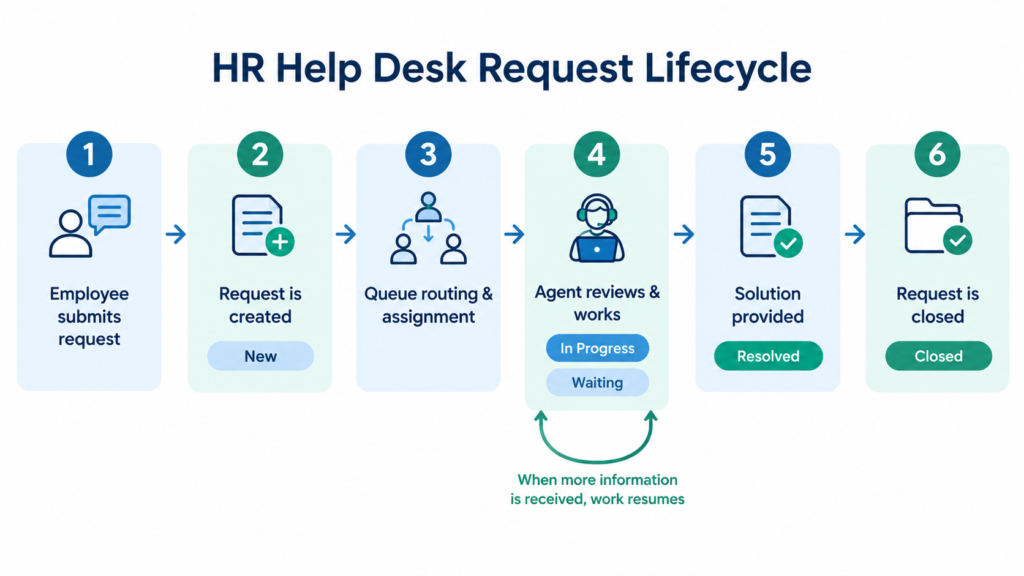
- Request creation: The employee accesses the available HR Help Desk page and submits a request with the relevant details.
- Request categorization: The request is categorized according to the available configuration.
- Assignment: The request is assigned or routed to the appropriate team or agent.
- Review and investigation: The assigned agent reviews the request, investigates the issue, and works towards an appropriate solution. If additional information is required, the agent may contact the employee or coordinate with another team.
- Solution Provided: Once the issue is understood and a solution is identified, the agent communicates the resolution to the employee.
- Request Closed: The agent completes the request according to the configured process.
The exact steps, status changes, and assignment behavior may differ between implementations. This example is intended to explain the general concept rather than define a mandatory workflow.
6. Your 3-Day Learning Plan
This plan assumes you understand basic HR processes and have access to an Oracle Fusion HCM practice environment.
| Day | What to learn | Expected outcome |
| Day 1 | Business use cases, key features, roles, terminology, and request lifecycle | Understand the purpose of HR Help Desk and how requests are handled |
| Day 2 | Categories, queues, assignment rules, and security basics | Understand the main configuration areas |
| Day 3 | Create and review a sample request, test the process, and investigate common issues | Build initial hands-on confidence |
The plan builds foundational understanding and initial hands-on confidence; it does not replace project experience.
7. HR Help Desk Beginner’s Learning Path
This article is the starting point for the HR Help Desk learning path on Tecolabs. The aim is to cover the essentials in a focused set of articles that you can work through over three days.
Continue with these articles in order:
- HR Help Desk Setup: Categories, Queues, and Assignment Rules – learn how requests are organized and routed.
- HR Help Desk Resources, Queue Assignment, and Security Roles – understand the key access-control considerations.
- Create, Test, and Troubleshoot an HR Help Desk Request – practise the request lifecycle and learn how to investigate common issues.
- For more detail, refer to the existing Tecolabs how-to articles on restricting HR Help Desk category visibility and configuring an HR Help Desk data security policy.
Conclusion
Oracle Fusion HR Help Desk gives organizations a structured way to manage employee HR requests. Start by understanding the business process, then learn the key setup areas and practise a request from creation to resolution. This learning path is designed to help you build a foundation and gain confidence through hands-on practice.
About this guide: Part of the HCM Foundation – HR Help Desk Beginner’s Guide learning series on Tecolabs.
4 Comments